|
|

|
| Release 4.0 |
 |
Quaternion - Light Parameters
|
The light tab contains all settings related to light sources. ChaosPro supports upto 8 light sources, each of them can have its own settings.
Light Model Panel
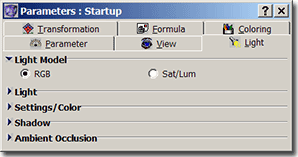
- Light Model
This setting cannot specified per light source: Once set, it applies to all 8 light sources.
A light model defines how light modifies the color of a pixel.
ChaosPro offers two light models in order to color quaternions:
- The RGB light model modifies the R, G and B components directly depending on the light falling onto a pixel.
- The Saturation/Luminance light model (short: Sat/Lum) modifies the saturation and luminance of a pixel depending on the amount of light falling onto a pixel.
The RGB light model is more physically oriented: If a red light source shines onto a grey ball, the ball will look red. Although the RGB light model is more physically oriented, the results look too colorful and thus not too realistic.
The Sat/Lum light model only modifies the saturation and luminance of a color. So if a pixel is blue, it remains blue when light falls onto it. Only the luminance and saturation of the color will be modified by the light. This light model normally produces more realistic looking objects.
The following two images show the same object, but rendered with different light model:
 |
 |
| RGB light model |
Sat/Lum light model |
|
|
Light Panel
The light panel itself lets you switch on/off each of the 8 light sources and change its position:
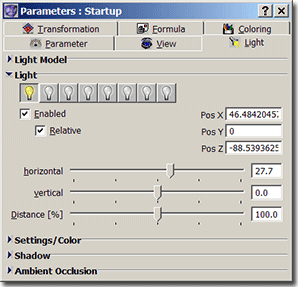
- Enabled If checked the light source is enabled, otherwise it is disabled and has no (absolutely no) effect. The light bulb above indicates whether a light is enabled or not and will change according to your selection here.
- Relative Specifies whether the light position is relative to the observer/camera. Without a very good spatial sense and exactly knowing where the observer is you are lost when specifying the light position.
If you check the "Relative" checkbox then the light position is specified in coordinates of the "Observer", i.e. 0/0/0 means:
The light source is where you are
x>0 means, the light source is at your right side
x<0 specifies your left side
y>0 specifies "above"
y<0 specifies "below" you
z>0 specifies in front of you
z<0 specifies behind you.
- Horizontal Specifies the longitude of the light position.
- Vertical Specifies the latitude of the light position.
- Distance Specifies how far away the light source is. If "Relative" is not checked, specifies the distance from (0/0/0), if "Relative" is checked, specifies the distance from the observer.
|
|
Light Settings/Color Panel
The Settings/Color panel lets you define properties of the light defined by the light model and the color of the light source.
There exist two different versions depending on the light model chosen. The two models differ in how the light itself and the specular light are defined:

Fig.: Sat/Lum light model

Fig.: RGB light model
The Sat/Lum light model does not modify the shade of color (hue) of a pixel: It only makes a pixel darker (upto black) or brighter (upto white):
So no matter how strong the light shines onto your object, if the object is red, it remains red. It will contain shades of red, ranging from totally black (no light shines onto an area) through all shades of red to white (full amount of light shines onto an area).
As such, in the Saturation / Luminance light model (see image at the left side) you can choose how strong the light influences the saturation and luminance of each pixel. And you can define the same for the specular highlight, i.e. how strong the specular highlight affects the saturation and luminance of each pixel of your fractal.
The other light model - RGB light model - affects the red, green and blue component of each pixel of your fractal depending on the color of the light. As such the light is defined by a color together with an intensity of how strong the color of the light will affect the color of a pixel.
The same applies to the specular highlight: In the RGB light model you define the color of the specular highlight and the intensity of it.
See below how the light color affects the color of an object.
|
- Color Allows you to specify the color of the light source as well as the intensity.
The ball below is a simple grey ball.
White light with intensity 1 and white specular light with intensity 1 is used.
|
The same grey ball, but now the light source throws red light onto it with intensity 1. |
And yet again, but now the intensity of the red light has been increased to 3. The grey ball looks red! |
 |
 |
 |
- Specular Allows you to specify the color of the specular light as well as the intensity.
| White specular light shines onto the ball.
|
Now blue specular light shines onto the ball with intensity 1.
|
And now blue specular light with intensity 3 is used. The size of the specular highlight does not change, but you can see it more clearly. |
|
 |
 |
- Ambient
'Ambient' is a number between 0 and 1 and determines, how much light falls on each area, independent of whether light from the light source actually falls on it. So it defines the minimum light intensity which falls on each pixel. A value of 1 doesn't make much sense, because then every area would be drawn with an intensity of 1 (brightest light). This is a pure artificial term, using this easy setting the light model used in ChaosPro tries to imitate the overall reflected light in a scene.
- Diffuse
Diffuse determines the proportion between the light from the light source and the "reflected" light (specified by Ambient). A value of 0.8 means, that 80% of the intensity of each pixel (area) is defined by the angle, in which the light from the lightsource falls on it, and 20% of the intensity by the angle, which is enclosed by the vector of the reflected light and the vector from the observer. That's a rather crude description, I think.
To be more general, it defines, whether the 3D-picture shines due to reflected light or due to light from the light source.
Normally Diffuse+Ambient should be equal to 1.
| Here Ambient is almost 0. You can see that the areas which are not exposed to the light appear black. No reflected light is taken into account.
|
Normal setting: Ambient=0.15, Diffuse=0.85. Even the dark areas at the bottom of the ball receive some light. This is due to the Ambient term.
|
...and now Ambient is set to 0.5, which is unnatural: Now it does not matter too much whether a point is hit by the light or not, it always receives a fair amount of light intensity. |
 |
 |
 |
- Shiny
Shiny determines the size of the shiny point, i.e. the specular highlight. The smaller the value, the smaller the specular highlight.
| This scene is rendered with Shiny=0.1, it looks like a polished billiard ball.
|
Same as before, Shiny=0.1. Such low shiny values produce polished surfaces or metallic looking surfaces.
|
This scene is rendered with Shiny=0.5, thus has a larger specular highlight and looks more like plastic.
|
 |
 |
 |
- Reflection
Reflection determines how reflective the object is: It determines how sharp the specular highlight will be. Try values like 1 (dull) or 20 (sharp) or values in between.
Shadow Panel
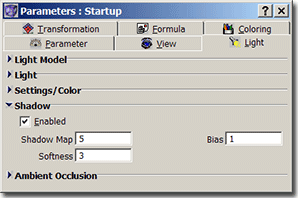 A light source can also cast a shadow. As casting a shadow is expensive (needs additional memory) and may be inaccurate (as it basically requires the complete object as viewed from the light source), it is by default switched off.
There are a few settings which can be defined for shadow casting, as mentioned below:
A light source can also cast a shadow. As casting a shadow is expensive (needs additional memory) and may be inaccurate (as it basically requires the complete object as viewed from the light source), it is by default switched off.
There are a few settings which can be defined for shadow casting, as mentioned below:
- Enabled Lets you specify whether the light source throws shadows.
- ShadowMap specifies the size of the shadow map as a multiply of the fractal width. Rendering correct shadows is very hard for Quaternions. In order to get a realistic shadow you need a shadow map which is much larger than the fractal itself. You might try 5 or 10, this of course increases memory usage dramatically. But when you are rendering an animation you normally don't have huge image sizes, but want to have correct shadows.
- Bias: One problem of rendering shadows using a shadow map are self-shadowing pixels. Due to rounding errors during projection onto the shadow map pixels may be shadowing themselves.
In order to prevent this some small corrective amount will be added to each shadow. The bias value is automatically determined by ChaosPro. Using this value here you can fine tune that value: It specifies a multiply for the value.
- Softness: If you want hard shadows, set it to 0 or 1. Then a pixel is either in shadow or not. If you set it to 2, then a 2x2 raster around the current pixel is scanned, resulting in 4 possible shades of shadow, 3 then means, a 3x3 raster is used, thus 9 shades of shadow. The higher the number, the softer the shadow, the longer the rendering time.
|
|
Ambient Occlusion Panel
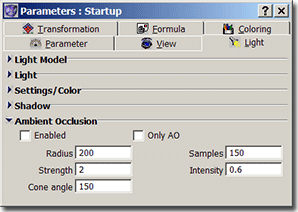
It is very difficult to write an algorithm which tries to simulate physical light. For ChaosPro it is impossible. There are light models, shadows, etc., and in order to create realistic looking objects you need all of these effects.
And yet there is some important part missing: Suppose there is a valley and a hill. Assume that light shines into the valley and the same light shines onto the hill. For sure you will see that in nature the valley still appears to be darker than the hill.
This is because in nature small parts of the light get reflected all around. As in the valley less objects are catching light they do not reflect it to other areas in the valley: It will in general appear darker.
This effect cannot be handled in ChaosPro. But there is a technique which tries to simulate that: It is called Ambient Occlusion. All it does is to scan the neighbourhood of a pixel: If many pixels are in front of that, the pixel is assumed to be "occluded". If not, the pixel is not occluded.
The technique works quite well, as you can see below:
- Enabled Lets you switch on/off ambient occlusion.
- AO Only If checked, displays the ambient occlusion buffer. This is of no real use, but it is quite interesting to see which parts of the objects seem to be occluded how much according to the algorithm.
- Radius Defines the neighbourhood to scan: 1 means default (about 20% of image size is considered to be neighbourhood).
- Samples ChaosPro cannot scan the complete neighbourhood. Due to that it scans by choosing samples. The more samples the better and more exact the scan will be. But the longer it takes...for animations you should increase the value to 200 or 500, otherwise there might be some strange "texture" in the object.
- Strength Strength of the effect: If the effect is too weak, increase it.
- Intensity Specifies how much the ambient occlusion term modifies the light intensity. May range from 0 (effectively switching it off) to 1 (ambient occlusion replaces light intensity).
- Cone angle Specifies the cone around each pixel: Only neighbours within that cone may occlude the pixel. Default is 150 degree, thus the cone is quite large.
| Mandelbulb closeup rendered without ambient occlusion and without shadow. It is hard to determine the depth of some areas. The 3D effect is good, but the object is somewhat "flat", not perfectly 3D.
|
|
Same as before, but rendered with shadows. A little bit better, as one can identify some parts which are behind others and which parts are in front of other parts.
|
 |
|
 |
| |
|
|
| And now the same scene with ambient occlusion enabled: The depth effect is much better. Parts lying deeper in the object are darkened, parts which are lying in front remain unmodified.
|
|
And this image displays the ambient occlusion buffer: Compare with the image: The shades of grey specify how much occluded ChaosPro thinks that a pixel is.
|
 |
|
 |
|
Fog Panel
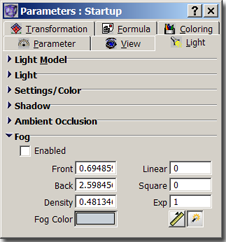
In order to add even more realism to an image ChaosPro implements some kind of fog: The farther away the image is the more the object color will be replaced by the fog color.
- Enabled Lets you switch on/off fog.
- Front Specifies the distance at which fog starts. All areas of the object which are nearer than this value are not affected by fog.
- Back In case of linear and square fog component: Specifies the back distance at which the fog is dense, i.e. density increases from "Front" to "Back" and is 1 at "Back".
- Density In case of exponential fog component: Specifies the fog density: The fog starts with density=0 at "Front" and then increases with the given density.
- Linear Defines how much from the linear fog component should be used compared to the square and exponential fog component. The absolute value does not matter, only the relationship to the other values.
- Square Defines how much from the square fog component should be used compared to the linear and exponential fog component. The absolute value does not matter, only the relationship to the other values.
- Exp Defines how much from the exponential fog component should be used compared to the linear and square fog component. The absolute value does not matter, only the relationship to the other values.
The fog functions used by ChaosPro are:
- Linear:
if distance<Front: FogDensity = 0
else if distance>Back: FogDensity = 1
else FogDensity=(distance-Front)/(Back-Front);
- Square:
if distance<Front: FogDensity = 0
else if distance>Back: FogDensity = 1
else FogDensity=((distance-Front)/(Back-Front))^2;
- Exp:
if distance<Front: FogDensity = 0
else FogDensity=1.0-exp(Density*(distance-Front));
| Mandelbulb closeup rendered without fog. No matter how far away a pixel is: It keeps its color.
|
|
Same as before, but rendered with fog. The farther away an area is the more it is mixed with the color of the fog.
|
 |
|
 |
|
|


